Skip to content
Product

Everything the product actually does today.

  • CaptureBlock editor and quick capture
  • Processing levelsYou choose how much changes
  • Version historyOriginals kept before AI edits
  • Review queueBig edits wait for approval
  • Atoms and sourcesNotes split, bound to sentences
  • SearchFull-text and meaning together
  • Grounded chatAnswers that cite your notes
  • Knowledge layerObjects, graph, timeline, calendar
See the whole product →
improvedOct 15, 2026You can find newly saved notes and keep your writing unchanged while connecting its ideas.All changes →
Use cases

What people bring to it.

  • Meeting notesTurn raw meeting notes into things you can act on.
  • ResearchPull scattered reading into one thread you can follow.
  • DecisionsFind the decision you made and the reason behind it.
  • WritingKeep the draft and get the clean version too.
See all four →
What’s newPricing
Resources

Reading and help.

  • BlogWriting on notes and AI
  • SupportAnswers and how to reach us
  • vs NotionWhere the two differ
  • vs ObsidianWhere the two differ
  • AppsDesktop app
Sign inStart free

Product

  • CaptureBlock editor and quick capture
  • Processing levelsYou choose how much changes
  • Version historyOriginals kept before AI edits
  • Review queueBig edits wait for approval
  • Atoms and sourcesNotes split, bound to sentences
  • SearchFull-text and meaning together
  • Grounded chatAnswers that cite your notes
  • Knowledge layerObjects, graph, timeline, calendar
See all →

Use cases

  • Meeting notesTurn raw meeting notes into things you can act on.
  • ResearchPull scattered reading into one thread you can follow.
  • DecisionsFind the decision you made and the reason behind it.
  • WritingKeep the draft and get the clean version too.

Resources

  • BlogWriting on notes and AI
  • SupportAnswers and how to reach us
  • vs NotionWhere the two differ
  • vs ObsidianWhere the two differ
  • AppsDesktop app
What’s newPricingSign inStart free

No credit card needed, with about 50 AI clean-ups every month

Product / The people, projects and topics in your notes

The people, projects and topics in your notes

Names you write become objects you can open, tags are generated as you go, and the connections between them are browsable as a graph, a timeline and a calendar.
Start free→
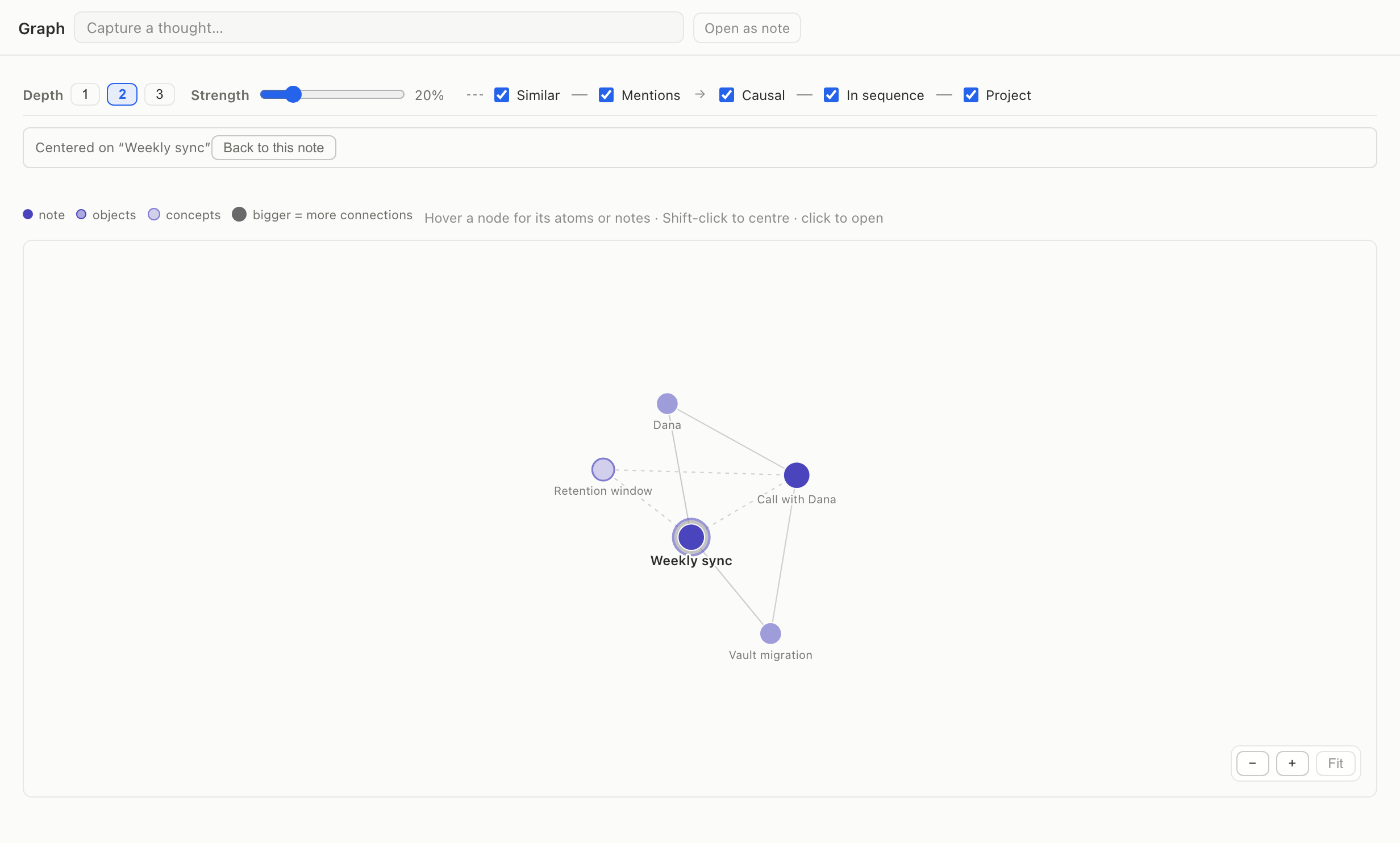
The knowledge graph connecting the Weekly sync note to related people, projects and concepts.
  • People, projects, books, events, tasks, places and organizations are recognized as objects.
  • A graph shows how ideas and objects connect across notes.
  • A timeline puts notes and events in order, and a calendar shows them by date.
  • Tags are generated while you write instead of being a filing chore.

Objects are derived from your notes and point back at them. They are a view, not a second copy.

Works with

  • Atoms and sourcesNotes split, bound to sentences→
  • Grounded chatAnswers that cite your notes→

Recent changes here

  • addedYour notes now build a knowledge layer you can browse as objects, a graph and a timeline.Aug 31, 2026
  • addedA calendar shows your notes by date, in month, week, day and agenda layouts.Aug 28, 2026

Questions

Do I have to tag anything myself?
No. Tags and objects are generated as notes are processed. You can still add your own.
Is this a second copy of my notes?
No. Objects are derived from your notes and point back at them — a view, not a duplicate.
What can I browse it as?
A list of objects, a graph of how they connect, a timeline in the order things arrived, and a calendar by date.
What it costs →

Try it on your own notes

Start free→

Product

  • Capture
  • Processing levels
  • Version history
  • Review queue
  • Atoms and sources
  • Search
  • Grounded chat
  • Knowledge layer

Use cases

  • Meeting notes
  • Research
  • Decisions
  • Writing

Resources

  • Blog
  • Changelog
  • Support
  • vs Notion
  • vs Obsidian
  • Apps
  • Google Play

Company

  • Privacy
  • Terms
  • Refunds

© 2026 Apioni, a product of Foo AI Corp., South Korea

contact@apioni.com